Jaya9 Registration in Bangladesh
Updated September 2026 · Checked against provider and operator sources
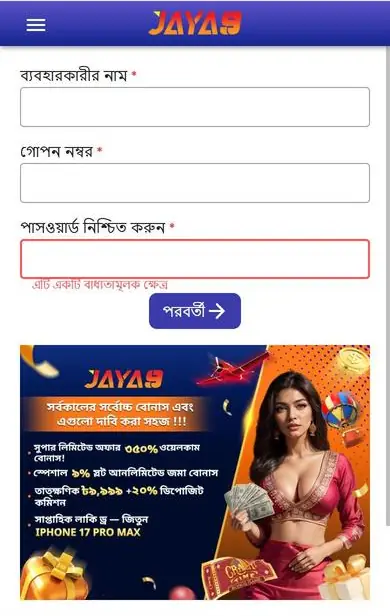
Registering at Jaya9 takes one form and one OTP. You choose a username and a password, enter a Bangladeshi mobile number, and confirm the code that arrives by SMS, after which the account opens straight into the lobby with the cashier one tap away. No documents are needed at this stage. The first deposit can be as low as BDT 200 and qualifies for the slot welcome bonus of 100% up to BDT 18,000. Press Sign Up on the Jaya9 site or app to begin.
What you need
| Item | Requirement |
|---|---|
| Age | 18 or older |
| Mobile number | Active Bangladeshi number that can receive SMS |
| Username | 6 to 15 characters, letters and numbers, not already taken |
| Password | 8 characters or more, with at least one letter and one number |
| Payment | bKash, Nagad, Rocket, UPay or bank account in your own name for later deposits |
One person, one account. Jaya9 checks name, phone, device and payment details for duplicates, and a second account gets closed with its bonus removed. Use your real name during any later verification, since withdrawals go only to a bKash, Nagad or bank account registered in that same name, and a mismatch is the most common reason a payout is held. Keep the login private. Bangladeshi numbers are expected, and the OTP goes to that number every time a new device logs in.
Step by step
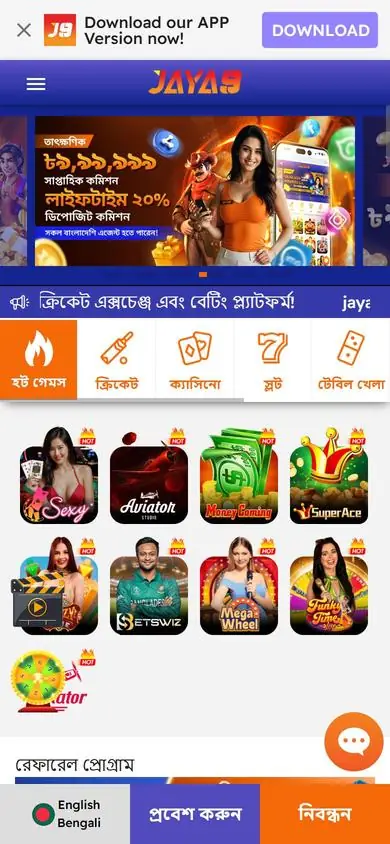
- Open Jaya9 and press Sign Up in the top-right corner.
- Enter a username, a password and the password again.
- Type your mobile number and request the OTP.
- Enter the six-digit code within the time shown and submit.
- Log in, open the cashier and make the first deposit.
The form accepts the number with or without the +880 prefix. If the OTP does not arrive in two minutes, check that the number is typed correctly, then use Resend once. Codes expire after a few minutes, and queuing several requests at once means the code you type may belong to an earlier request that has already been replaced by a newer one. A referral code field appears on the form; fill it only if a friend gave you one. Usernames are permanent, so pick one you do not mind seeing for years. Passwords need letters and numbers. A password manager saves both. The whole form fits on one screen without scrolling on most phones, and the OTP screen follows it directly. Referral codes cannot be added later.
Choose your welcome bonus at the first deposit
The bonus is selected in the cashier, not on the registration form. When you make the first deposit, a promo code drop-down lists the slot welcome, the live casino welcome and the TITO welcome. Pick one before you press Deposit. The bonus is credited automatically after the payment clears, and the wagering counter starts at that moment. Skip this step and the deposit lands as a plain top-up with no bonus attached, so it pays to read the drop-down slowly. Players who are unsure which of the three offers fits them can leave the first deposit until they have read the comparison on the welcome bonus page, as the welcome labels stay available until the first deposit is actually made.
Register on a phone
Android users can install the Jaya9 APK and register inside the app, or open the site in Chrome and register there. On iPhone, open the site in Safari and add it to the home screen; the iOS page shows the two taps involved. Same form, every device. SMS codes arrive on the phone you are using, which makes mobile registration slightly faster than desktop. A borrowed phone works too, as long as you log out at the end. The account belongs to the number and the password, not to the device.
Common registration problems
| Problem | Fix |
|---|---|
| Username rejected | Already in use or contains a symbol; try another |
| Number already registered | You have an account; use account help to recover it |
| OTP never arrives | Check the number, wait two minutes, press Resend once; contact live chat if it fails again |
| Page will not load | Switch from Wi-Fi to mobile data or clear the browser cache |
| Form freezes after submit | Refresh and try to log in; the account may already exist |
Live chat is available inside the site before you log in, and the agent can see whether your number already has an account attached, which solves most stuck registrations in a single message. Describe the exact message you saw and the number you used. Do not send your password. Support can release a stuck number or confirm an account was created.
Your first hour on Jaya9
Log in and open the cashier first, and get the deposit and the bonus sorted before you start exploring the lobby, since the promo code can only be attached at payment time. Then browse slots, the live casino or the sportsbook, depending on the bonus you took. Set a session budget before the first spin. Jaya Rank starts counting from your very first bet, and progress is visible on the VIP page inside the account. When you want a break, log out on shared devices. Enable a screen lock on the phone that stays signed in. Complete KYC through the account menu in the first week so the first withdrawal is not delayed by it. Save the live chat location. Those four small steps remove nearly every problem players report later.